






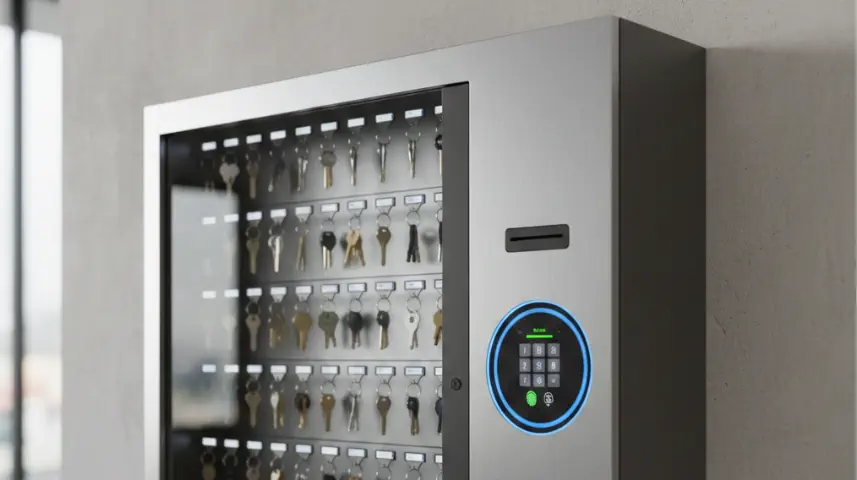
Access-Controlled Key Cabinets: A Must-Have for Keys Management System
As operations become digitized and compliance-driven, access-controlled keys management system is becoming the standard choice across many industries - especially where physical keys play a critical role - such as hotels and resorts, hospitals, corporate offices and IT parks, manufacturing plants, and so on.
Using access control in a key management system ensures that only authorized people can take specific keys, and every key movement is recorded. This means you always know who took which key, when, and why. It prevents misuse, loss, and unauthorized access to sensitive areas—like server rooms, vehicles, or equipment.
We discuss a few of its benefits in this blog.
Without access control, a key cabinet is essentially just a storage box. Anyone can open it, pick any key, and walk away—with no record and no accountability. Keys can go missing, be duplicated, or be misused without anyone realizing. It becomes impossible to track responsibility and accountability. Security is left to trust and manual checks. Access control turns a simple cabinet into a secure, accountable, automated system, protecting both assets and people.
Access control also makes the process faster and safer because users authenticate with a PIN, card, biometric, or mobile app, and the cabinet automatically releases only the keys they’re allowed to use.
A modern key cabinet is integrated with multiple access control methods to ensure only authorized users can take or return keys. In this blog, we discuss some of the top access control solutions used in keys management systems.
1. PIN Code Access (Basic)
The user enters a numeric PIN on the keypad to unlock the cabinet or release a key. PIN code access means each user types a personal numeric code on the cabinet’s keypad to open it or take a key. It ensures that only authorized people can access the keys, and every action can be tracked. It’s a simple, familiar method—similar to using an ATM PIN.
2. RFID / Proximity Card Access
Users tap on the cabinet an RFID card, employee badge, or access card to authenticate. This unlocks the cabinet. It’s quick, touch-free, and reduces the need to remember PINs. The system also logs who accessed which key, making tracking easier and more secure.
3. Biometric Authentication
This ensures relatively stronger security using fingerprint and face recognition. Biometric authentication means the cabinet verifies a person’s identity using their fingerprint or face instead of a PIN or card. This ensures only the right person can take a key, since biometrics cannot be shared or borrowed. It adds a strong layer of security and prevents misuse.
4. Bluetooth / Mobile App Authentication
Users authenticate and unlock the key cabinet or take a key using their mobile phone—either through the app, a Bluetooth signal, or an NFC tap. It removes the need for PINs or physical cards and is especially helpful for staff who work in the field and rely on their phones. It makes access faster, easier, and more flexible.
5. Dual Authentication Systems
This means a person must use two different ways to prove their identity before a key is released—for example, tapping a card and entering a PIN, or using a fingerprint and a mobile app. This adds an extra layer of security so that even if one method is misused, the key still cannot be accessed. It is mainly used for high-security keys like master keys, server room keys, or weapon keys, where stricter controls are essential.
6. Remote Authorization / Supervisor Approval
As per this method, a key can only be taken after a supervisor approves the request, even if they aren’t physically present. The operator asks for the key, and the supervisor can approve it from a web dashboard or mobile app (sometimes through an OTP). This ensures that high-risk or sensitive keys are released only with proper oversight. As per this method, a key can only be taken after a supervisor approves the request, even if they aren’t physically present.
As per this method, a key can only be taken after a supervisor approves the request, even if they aren’t physically present.
7. OTP-Based Access
In this method, the user gets a one-time password (usually by SMS or email) to unlock the cabinet or take a specific key. It’s mainly used for temporary users, contractors, or visitors who don’t have a permanent ID card or login. The OTP works only once, which keeps the process secure and prevents misuse.
8. Key-by-Key Access Permissions
In a key-by-key access permission, even after a person logs in, they can only take the specific keys assigned to their role—nothing else will unlock for them. The cabinet physically blocks all other keys, so there’s no chance of someone accidentally or intentionally taking a key they’re not authorized to use. This keeps high-risk or sensitive keys safe while still allowing easy access to the ones people actually need.
9. Integration with Existing Access Control Systems
When the keys management system is integrated, the key cabinet connects to your company’s existing security systems—like employee ID cards, door access systems, or HR databases. This lets staff use the same ID card or login they already use to enter the building, instead of managing separate credentials for the key cabinet. It keeps everything unified, reduces admin work, and ensures only active, authorized employees can take keys.
10. A Unified Platform Approach
A unified platform approach means all key cabinets, user permissions, and access logs are managed from one central system instead of separate, disconnected setups. Not just this, the same software is used for processes such as visitors, guards, assets, and parking. Instead of having separate systems for each task, everything runs on one common platform. This makes it easier for staff to learn, use, and manage, and ensures all data stays connected and consistent. Everything can be tracked in one place. This makes it easier for organisations to manage security, avoid mistakes, and scale across multiple sites.
Access-controlled key management is becoming increasingly common and its adoption is growing rapidly in mid- to large-scale industries — especially where security, compliance, or asset control matters.
Technological innovations in access control—especially IoT and cloud-based systems—have transformed key management from a simple storage cabinet into a highly sophisticated security solution.
IoT-enabled key cabinets can track every key movement in real time, lock individual key positions, and instantly alert supervisors to any unusual activity. Cloud platforms make it possible to monitor multiple locations from anywhere, manage user access remotely, and maintain detailed digital logs without relying on manual effort. Together, these technologies provide a level of control, transparency, and security that traditional key cupboards or registers simply cannot match.